
Technology is at its best when it solves real human problems. This was the driving force behind VisionMate, a project I developed to help the visually impaired navigate the world with more confidence.
The Problem
Visually impaired individuals face daily challenges that sighted people rarely consider: the inability to identify objects and obstacles in unfamiliar environments, the difficulty of reading printed text on signage or menus, and the challenge of navigating from one place to another without constant assistance. While smartphone screen-readers have improved digital accessibility, they address only in-app content and remain silent about the physical world around the user.
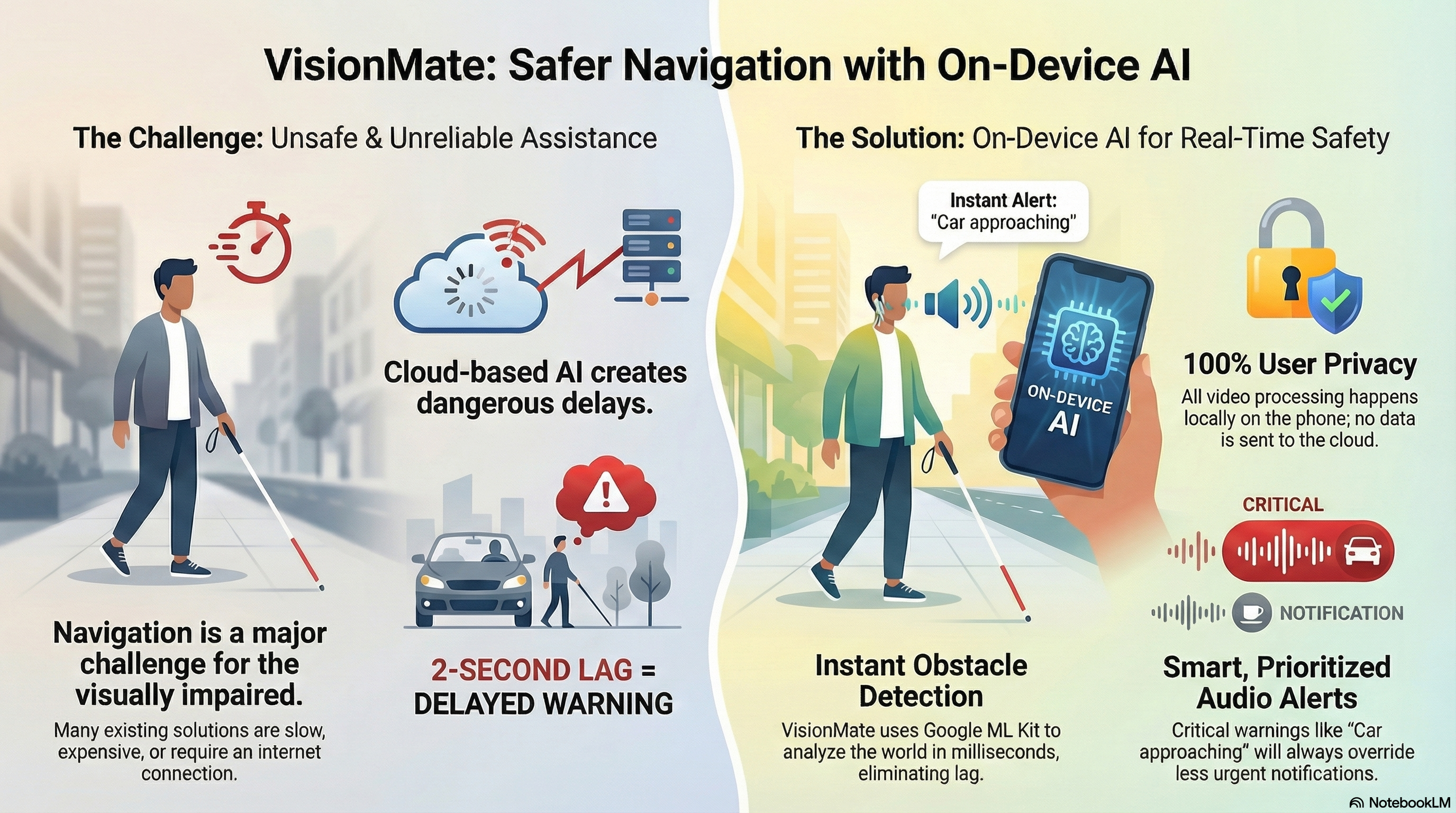
Existing solutions often rely on heavy cloud processing (causing dangerous lag) or expensive hardware like OrCam MyEye (costing upwards of USD 3,500). I wanted to build something accessible, fast, offline-first, and affordable.
The Solution
VisionMate transforms a standard Android smartphone into a comprehensive real-time assistive companion, capable of perceiving its physical environment and communicating that information to the user through audio alone. At its core, VisionMate pairs the Android device with an inexpensive wearable ESP32-CAM Wi-Fi camera module that continuously transmits a live MJPEG video stream to the app.
The Tech Stack
I built VisionMate using:
- Mobile Framework: Kotlin with Jetpack Compose (not React Native — this is a native Android app)
- AI Engine: Google ML Kit for on-device object detection, image labeling, and text recognition
- Camera: ESP32-CAM wearable module (under USD 10) or phone's built-in back camera via CameraX
- Navigation: Google Directions API with Mapbox fallback, plus synthetic demo route as last resort
- Database: Room for user persistence, SQLite for saved locations
- Architecture: Single-Activity Compose app with manual back-stack
Core Features
Real-Time Obstacle Detection
Every camera frame is processed through Google ML Kit Image Labeling (400+ object categories). Results above a 0.5 confidence threshold are sorted and the top 3 are announced via Text-to-Speech. Each detection includes a distance estimate: "very near" (>80% confidence), "near" (>60%), "medium distance" (>40%), or "far". To prevent the same object from being announced repeatedly, I implemented an AlertThrottleManager with per-label cooldown gates that obey the user's AlertVerbosity setting (MINIMAL=12s, NORMAL=8s, VERBOSE=4s). Safety override bypasses cooldown for "very near" warnings.
OCR Text Recognition
Using ML Kit Text Recognition (Latin script), VisionMate extracts text from continuous camera stream frames. Word-level bounding boxes are rendered as overlay rectangles on the camera preview, and the full recognized text is spoken aloud immediately upon detection — enabling users to read printed content without halting their movement.
GPS Navigation with Voice Guidance
The navigation module provides turn-by-turn walking directions using Google Directions API as the primary source and Mapbox Directions API as a programmatic fallback. If both APIs fail, a synthetic five-step demo route is generated as a last resort. Key features include:
- Route deviation detection (100m threshold triggers automatic recalculation)
- Step advancement at 15m proximity
- Pre-turn warnings at 100m ("prepare") and 30m ("imminent")
- Periodic straight-segment re-announcements every 90 seconds
- Background sensing during navigation: Dual ML Kit pipeline (Image Labeling + Object Detection) runs concurrently, providing directional distance warnings and avoidance hints
Emergency SOS Alert System
VisionMate includes a critical safety feature triggered in four distinct, screen-off-capable ways:
- Volume-up long-press (≥800ms via Android AccessibilityService)
- Earphone triple-tap (via AccessibilityService)
- Media previous key press (via AccessibilityService)
- Foreground volume-up long-press (via MainActivity)
When triggered, it automatically sends an SMS to the pre-configured emergency contact containing a Google Maps location URL and the user's medical conditions.
Hands-Free Control
VisionMate is designed to be operated entirely without looking at the screen:
- Tap gestures: Single, double, triple taps on home screen
- Wired earphone control: Single-click (voice command), double-click (cycle mode), triple-click (SOS)
- Volume key long-press: SOS trigger
- Voice commands: "I need to go to [location]", "enable obstacle detection", "enable OCR"
Architecture Deep Dive
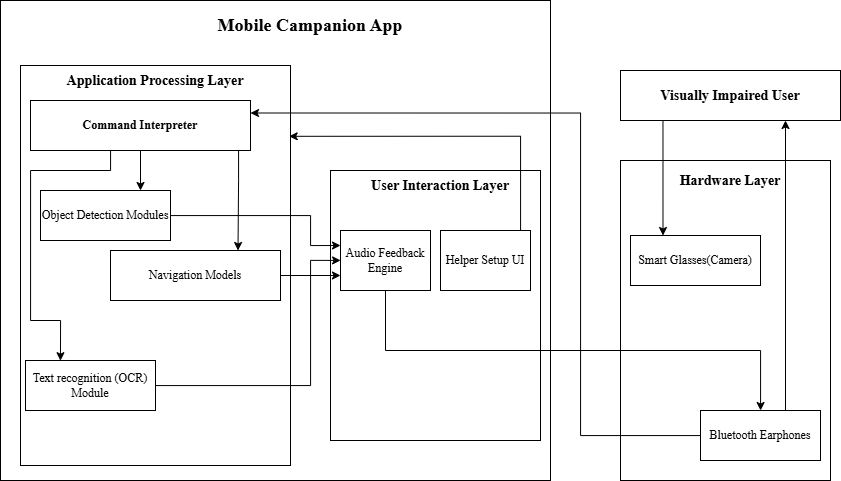
The system is built around a persistent Android Foreground Service (VisionEngineService) that owns all long-running resources — camera stream, ML inference pipelines, TTS engine, WakeLock, and WifiLock — ensuring the system continues sensing even when the app is minimized. The Jetpack Compose presentation layer binds to this service, observing an EngineState StateFlow and recomposing reactively on changes.
The architecture consists of 16 distinct modules:
- Authentication & Session Management: Room database, email/password validation, session persistence
- Navigation Controller: Manual back-stack using mutableStateListOf
- Vision Engine Service: Foreground service with WakeLock/WifiLock
- Obstacle Detection: ML Kit Image Labeling with AlertThrottleManager
- OCR Text Recognition: ML Kit Text Recognition with bounding box overlay
- GPS Navigation: Dual-API fallback, Fused Location Provider
- ESP32 Camera Stream Manager: 8 fallback URLs, MJPEG/JPEG auto-detection
- Voice Command System: SpeechRecognizer with keyword parsing
- SOS Emergency Alert: 4 trigger paths, SMS with location
- Accessibility Service: Hardware key interception
- Saved Locations Manager: SQLite CRUD with voice keywords
- User Profile Management: Emergency contact and medical info
- Onboarding & Permissions: Runtime permission handling
- Settings & Configuration: In-memory settings state
Why On-Device ML?
The key technical decision was using Google ML Kit. Unlike cloud APIs that require an internet connection to "see" an image, ML Kit runs directly on the user's phone.
This offers two massive advantages:
Latency: Object detection happens in under 200ms on mid-range hardware. When a user is walking towards an obstacle, a 2-second lag due to bad network service could be dangerous. On-device ML eliminates that risk.
Privacy: No video feeds are sent to a remote server. Everything is processed locally, critical for users in low-connectivity environments who still need assistive technology.
What I Learned
Building VisionMate taught me the importance of user-centric design. It wasn't enough to just "detect objects." The audio feedback had to be clear, non-intrusive, and prioritized. We implemented a sequential processing guard that prevents a new frame from being processed before TTS finishes the previous announcement.
It's one thing to code an algorithm; it's another to build a safety net for a human being. VisionMate represents my commitment to building technology that truly serves those who need it most — accessibility isn't just a feature, it's the foundation of the entire design.